
第十三章:Shell脚本入门
- 脚本格式
脚本以 #!/bin/bash 开头(指定解析器)
第一个Shell脚本:helloworld.sh
- 需求:创建一个 Shell 脚本,输出 helloworld
- 案例实操:
Shelltouch helloworld.sh vim helloworld.sh # 在 helloworld.sh 中输入如下内容: #!/bin/bash echo "helloworld"脚本的常用执行方式
- 第一种:采用
bash 或 sh + 脚本的相对路径或绝对路径(不用赋予脚本 +x 权限)
sh + 脚本的相对路径
shellsh ./helloworld.sh
sh + 脚本的绝对路径
shellsh /root/myscripts/helloworld.sh
bash + 脚本的相对路径
shellbash ./helloworld.sh
bash + 脚本的绝对路径
shellbash /root/myscripts/helloworld.sh
- 第二种:采用输入脚本的绝对地址或相对路径执行脚本
(必须具有可执行权限 +x)
1.首先要赋予 helloworld.sh 脚本的 +x 权限
shellchmod +x helloworld.sh
2.执行脚本
相对路径
shell./helloworld.sh绝对路径
shell/root/myscripts/helloworld.sh注意:
第一种执行方法,本质是 bash 解析器帮你执行脚本,所以脚本本身不需要执行 权限。
第二种执行方法,本质是脚本需要自己执行,所以需要执行权限


- 第三种【了解】:在脚本的路径前加上
.或者source
分别使用 sh,bash,./ ,rouce 和 . 的方式来执行,结果如下:
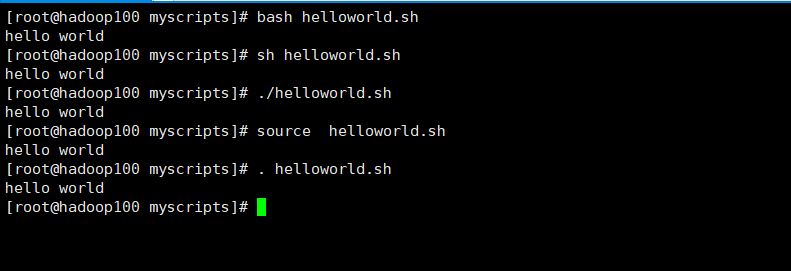
原因:
前两种方式都是在当前 shell 中打开一个子 shell 来执行脚本内容,当脚本内容结束,则 子 shell 关闭,回到父 shell 中。
第三种,也就是使用在脚本路径前加 “.” 或者 source 的方式,可以使脚本内容在当前 shell 里执行,而无需打开子 shell!这也是为什么我们每次要修改完 /etc/profile 文件以后,需 要 source一下的原因。
开子 shell 与不开子 shell 的区别就在于,环境变量的继承关系,如在子 shell 中设置的 当前变量,父 shell 是不可见的
- 第一种:采用