
第二十一章:文本处理工具
1. cut
cut 的工作就是“剪”,具体的说就是在文件中负责剪切数据用的。cut 命令从文件的每 一行剪切字节、字符和字段并将这些字节、字符和字段输出。
- 基本用法
shell
cut [选项参数] filename
说明:默认分隔符是制表符- 选项参数说明
| 选项参数 | 功能 |
|---|---|
| -f | 列号,提取第几列 |
| -d | 分隔符,按照指定分隔符分割列,默认是制表符"\t" |
| -c | 按字符进行切割,后加 n 表示取第几列,比如 -c 1 |
案例实操
- 数据准备
shelltouch cut.txt vim cut.txt dong shen guan zhen wo wo lai lai le le切割 cut.txt 第一列
shell
cut -d " " -f 1 cut.txt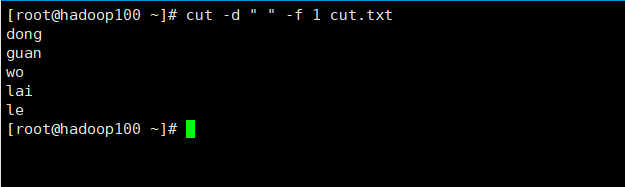
- 切割 cut.txt 第二、三列
shell
cut -d " " -f 2,3 cut.txt

或

cut -d " " -f 2-3 cut.txt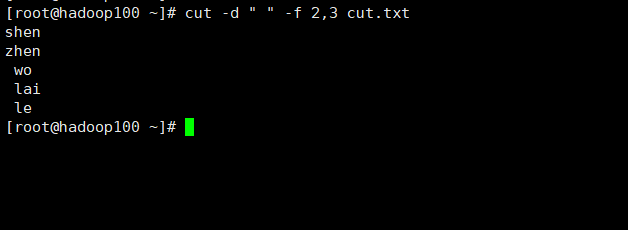
- 在 cut.txt 文件中切割出 guan
shell
cat cut.txt | grep guan | cut -d " " -f 1
- 选取系统PATH变量值,第 2 个 ":" 开始后的所有路径:
shell
echo $PATH
echo $PATH | cut -d ":" -f 3-  # '-' 表示所有,3- 表示第三列开始后的所有
- 切割 ifconfig 后打印的 IP 地址
shell
ifconfig
ifconfig ens33 | grep netmask | cut -d " " -f 10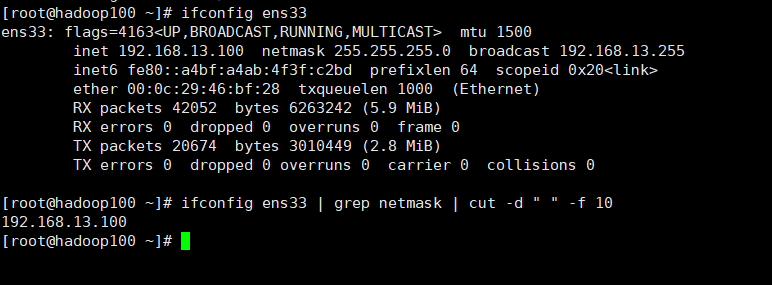
2. awk
一个强大的文本分析工具,把文件逐行的读入,以空格为默认分隔符将每行切片,切开 的部分再进行分析处理。
- 基本用法
shell
awk [选项参数] '/pattern1/{action1}  /pattern2/{action2}...' filename

pattern:表示 awk 在数据中查找的内容,就是匹配模式
action:在找到匹配内容时所执行的一系列命令- 选项参数说明
| 选项参数 | 功能 |
|---|---|
| -F | 指定输入文件分隔符 |
| -v | 赋值一个用户定义变量 |
案例实操
- 数据准备
shellpasswd 数据的含义 用户名:密码(加密过后的):用户 id:组 id:注释:用户家目录:shell- 搜索 passwd 文件中以 root 关键字开头的所有行,并输出该行的第七列
shellawk -F : '/^root/ {print $7}' /etc/passwd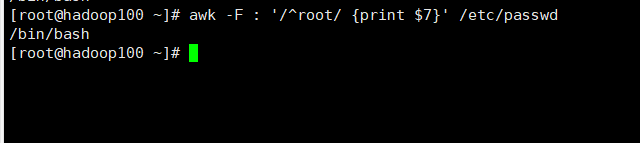
- 搜索 passwd 文件以 root 关键字开头的所有行,并输出该行的第 1 列和第 7 列, 中间以 "," 号分割
shellawk -F : '/^root/ {print $1","$7}' /etc/passwd
注意:只有匹配了 pattern 的行才会执行 action
- 只显示
/etc/passwd中以 root 关键字开头的第一列和第七列,以逗号分割,且在所有行前面添加列名user,shell在最后一行添加dahaige,/bin/zuishuai
shellawk -F : 'BEGIN{print "user,shell"} /^root/ {print $1","$7} END{print "dahaige,/bin/zuishuai"}' /etc/passwd
注意:BEGIN 在所有数据读取行之前执行,END 在所有数据执行之后执行
- 将 passwd 文件中的用户 id 增加数值 1 并输出
shellawk -v i=1 -F : '{print $3+i}' /etc/passwdawk 的内置变量
| 变量 | 说明 |
|---|---|
| FILENAME | 文件名 |
| NR | 已读的记录数(行号) |
| NF | 浏览记录的域的个数(切割后,每一行中列的个数) |
案例实操
- 统计 passwd 文件名,每行的行号,每行的列数
shellawk -F : '{print "文件名:" FILENAME,"行号:" NR,"列数:" NF'} /etc/passwd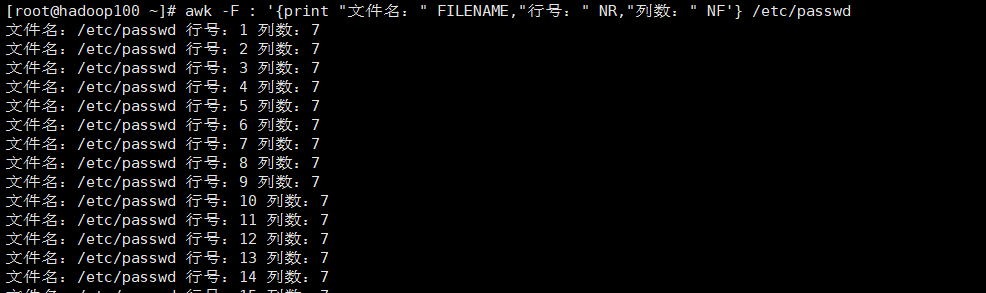
- 查询 ifconfig 命令输出结果中的空行所在的行号
shellifconfig | awk '/^$/ {print NR}'
- 切割 IP
shellifconfig ens33 | awk '/netmask/ {print $2}'